
In April 2026, Meta announced that it has introduced a new way to install the Conversions API (CAPI) with a single click.
This is great news for many reasons, as a charity using both the Pixel and CAPI will benefit from seeing more events and conversions tracked compared to the Pixel alone.
But how excited should we be about this change? Short answer: cautiously excited if you’re a small charity, less so if you’re spending real money. Here’s why.
What is the Meta Conversions API?
CAPI is a way to send data about what people do on your website (like donating) directly to Meta, without relying on the user’s browser to pass it on .) It passes the same information to Meta only when the user has consented to cookies, same as the Pixel, to remain UK-GDPR compliant. .
Think of the Pixel as a postcard you ask the user’s browser to post for you. Sometimes it gets lost in transit – the browser blocks it, an ad blocker eats it, the cookie expires. CAPI is the same message, but you’re posting it yourself directly from your server. Meta then matches the two up so it doesn’t count the same thing twice. In both instances, the same data (postcard) reaches the same recipient (Meta Ads). Meta can then de-duplicate these to realise that it has the same data twice to avoid any double-counting.
CAPI has always been a strong recommendation for all organisations using Meta Ads. To understand why CAPI is important, it is key to understand the role of the browser a user visiting your site is using.
Browsers like Safari, Firefox and Brave already block much of the data the Pixel tries to send. Google was poised to do the same in Chrome, which would have meant up to 75% of browsers blocking it. Even without that, you’re losing a lot of data without CAPI.
CAPI provides a way to send the same data that is sent to Meta via the Meta Pixel but without the need for third-party cookies (cookies set by other websites). Meta itself has evidence that suggests that the average organisation sees 17.8% lower cost per result (donation, sign-up or other key conversion event) compared to those without CAPI, which is due in large part to its ability to avoid browsers blocking any tracking, known as Tracking Prevention.
There are multiple ways to set up CAPI, and there are pros and cons related to both, but the key point is that a CAPI is better than no CAPI at all.
How effective is the one-click set-up?
It is important to consider whether the one-click set-up is the right option for your organisation to take.
Whilst it is quick and efficient, I believe that its simplicity risks you losing out on some of the benefits of a more robust approach.
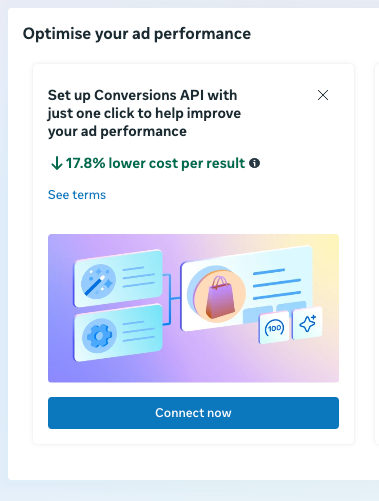
It really is a single click!
Many browsers prevent CAPI from working
The one-click setup routes data through Meta’s servers, which most browsers still treat as third-party. So you’re getting some of the lift, but not all of it.
So whilst it is simple, it will likely result in a lower than average improvement in Cost Per Result than a more robust set up, as less data is tracked.
Setting up CAPI with Google Tag Manager
Another way for many organisations to set up Meta’s CAPI is to use Google Cloud Platform and Google Tag Manager.
Through Google Cloud Platform, you are able to create a new server, which can then be used on Google Tag Manager to create a server-side container.
Unlike the one-click setup, you are passing data to a subdomain on your own website (often it will be called something like ‘metrics.charityname.org.uk’). This helps to avoid some of the tracking prevention, but it does not avoid all tracking prevention approaches taken by ad blockers and browsers.
It costs roughly £30 to £200 per month to run, depending on traffic, plus setup time from someone who knows what they’re doing.
Whilst it is not overly complicated to set up, it is not necessarily something someone without the knowledge of Google Tag Manager and server-side tracking can easily do. This can often then incur fees for an expert to install it and maintain it for you.
Same-origin approaches
The best setup sends data from your own website, on the exact same web address the user is already on. Browsers and ad blockers don’t block this because it’s not crossing any boundary – it’s all happening within your site. It’s the cleanest signal Meta can get, but it takes the most work to build.
For instance, in the same example as above, a same-origin approach would see a user on donate.charityname.org.uk have data sent to the server via donate.charityname.org.uk/metrics. This slight change ensures more data reaches Meta and other marketing platforms (like GA4, Google Ads, Tiktok etc) as browsers and ad blockers do not prevent requests from the same-origin.
Which method should your charity use?
There is no one-size-fits-all approach here. I’ve tried to broadly split this answer into small, medium and large charities.
Small charities / charities spending very little on Meta Ads
The answer broadly depends on the amount of ad spend you are spending.
Small charities with low amounts of spend on Meta Ads will see the most benefit from a one-click set-up as this helps to pass some additional data without the added hassle or overheads. This is still significantly better than no CAPI.
Small charities may not be hitting the amount of conversions needed to really benefit from Meta’s machine learning, so spending money on doing anything more than the one-click set-up is likely not justifiable.
Small charities may find it better to create campaign-specific donation pages and rely more on this to assess the performance of their campaigns as a CRM can tell them which campaign the user donated through. CAPI is still helping the Meta algorithm to learn and there is no added cost associated with its use.
Medium charities / charities running Meta Ads for big campaign moments
This is likely to be where a more sophisticated set-up becomes more attractive.
The added learnings and data available to Meta Ads by having a set-up which can counter some of the tracking prevention techniques used by browsers and ad blockers can help to drive down Cost Per Result. That’s because more data is tracked and fed back to Meta’s algorithm.
This has always been where the Google Tag Manager implementation has been deemed necessary – and the new one-click set-up has not changed this.
Medium-sized charities will likely still want to consider running CAPI at least on its own subdomain, via Google Tag Manager and Google Cloud.
If you’re spending six figures a year on Meta, the same-origin approach pays for itself. The setup cost is meaningful, but the improvement in data quality compounds across every campaign, and increasingly across Google, TikTok and your analytics too!
Three things that will improve your setup
All this is frustrating for any marketer but there are things you can do to improve the picture.
1. Any CAPI beats no CAPI
Even in its most basic form, more data is being passed to Meta via a Pixel + CAPI set-up versus a Pixel-only set-up.
Meta’s new ad-serving system, Andromeda, leans even harder on conversion data to optimise and highlights the importance of the Conversions API as Andromeda relies on utilising data about user actions to effectively optimise. This has always been the case, but post-Andromeda it seems more important than ever before.
2. Understand the importance of server side tracking for other channels too
Google Ads, TikTok and Google Analytics 4 can all receive data via server-side tracking.
All of these have proven to also drive down Cost Per Result as more data is made available to the machines using it to learn and optimise effectively, and to the marketers who can use better data to make informed decisions.
3. Review the data available to make a business case for further investment in CAPI and server-side tracking
Check your Pixel vs Server event counts in Meta’s reporting. If Server events are higher, CAPI is doing its job. If they’re roughly equal, something’s off – and that’s the data point you need to make the case for upgrading your setup.
We can help build a clearer picture
Not sure which approach is right for you?
The honest answer is: it depends on how much you’re spending, what your site looks like, and what you’re trying to measure. We help charities figure that out, then build the right setup.
Find out more about our data services or get in touch if you’d like a hand.